
Für jeden Bereich, in dem Struktur hilft
Ob privat, im Team oder im Betrieb: Karina passt sich Ihren Abläufen an.
Wählen Sie den Bereich, der am besten zu Ihnen passt.




Bereits über 5.000 Nutzer organisieren mit Karina ihren Alltag – vom Privathaushalt bis zum Handwerksbetrieb.
Document
Photos, Videos, Notes
Manage Team
Share tasks
Communicate
Update customers
Track Material
Keep inventory in sight
Capture Work.
Manage Projects.
Document every work directly on site. Capture progress with photos and videos, assign tasks, and keep all projects in view.
Die wichtigsten Features
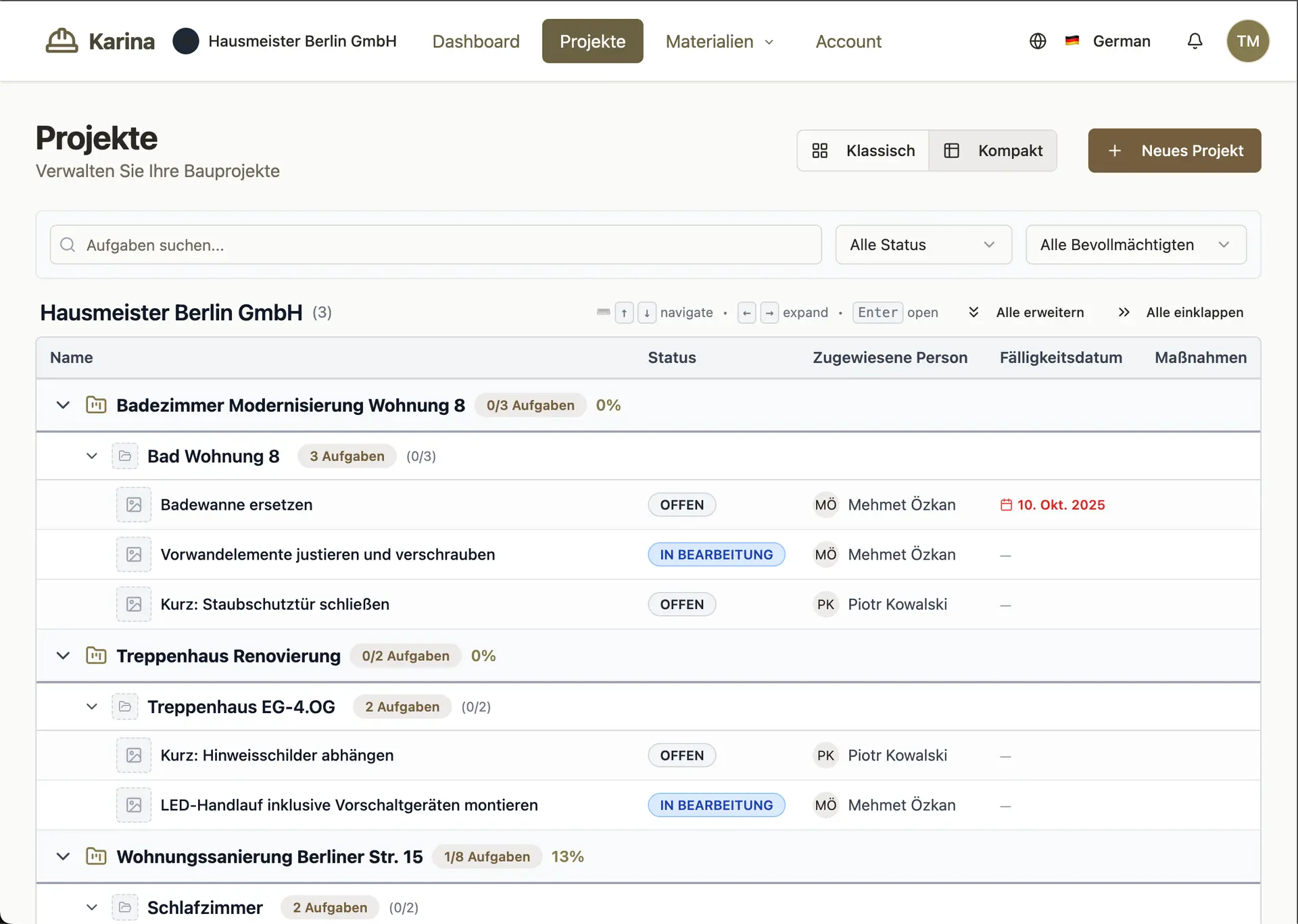
Projektverwaltung
Mehr erfahren
Arbeitsprotokoll
Mehr erfahren
Material-Reservierung
Mehr erfahren
Von Menschen genutzt, die Ordnung lieben.
Karina unterstützt täglich Privatpersonen, Handwerker und Teams dabei, Chaos in Klarheit zu verwandeln.
„Ich nutze Karina, um endlich den Überblick über meine Projekte und Unterlagen zu behalten. Es spart mir jeden Tag Zeit."
„Für mich ist Karina wie ein digitales Notizbuch, das Ordnung schafft. Ich finde sofort, was ich suche."
„Wir dokumentieren unsere Abläufe jetzt mit Fotos und Kommentaren. Jeder im Team weiß, was erledigt ist."
Bereits über 5.000 Nutzer organisieren ihren Alltag mit Karina – und es werden täglich mehr.
One Price. Everything Included.
Entdecken Sie, was mit Karina möglich ist.
Jeder hat sein eigenes Chaos. Finden Sie heraus, wie Karina in Ihrem Alltag hilft, Ordnung zu schaffen.
Frequently Asked Questions
Everything you need to know about Karina.
Karina is modern software for construction project management. You can organize your construction projects, distribute tasks, and manage materials. Perfect for construction companies, project managers, craftspeople, and anyone who wants to keep track on the construction site.
With Karina, you always keep track of your materials and tools. You can see at a glance what is stored where, reserve materials for specific projects, and document transfers between storage locations. This helps you avoid bottlenecks and unnecessary duplicate purchases.
Yes, Karina is made for teamwork! You can invite team members, assign different roles (e.g., project manager, craftsperson, or read-only access) and give everyone exactly the rights they need. Everyone sees immediately what needs to be done.
Absolutely! Karina is optimized for all devices - whether smartphone, tablet, or computer. Your team can update tasks, upload photos, or record material movements directly from the construction site.
Yes! Karina speaks 12 European languages - perfect for international teams. Whether German, Polish, Turkish, Romanian, or other languages - everyone can work in their preferred language. This is especially practical on multicultural construction sites.
You can create tasks, set deadlines, and assign them to specific people. Everyone sees their personal task area, can update the status (open, in progress, completed) and add comments or photos. So you always know where your project stands.
Yes, you can create and manage any number of projects in parallel. Each project can be divided into areas (e.g., "Ground Floor", "Attic"), and you have a separate overview of tasks, materials, and team members for each project.
Your data is securely encrypted and stored in professional data centers. Each company has its own protected area, and only authorized team members have access. We take data protection very seriously.
10€ per user per month. With annual payment 9€. Period. You get: All features, guests free, no setup fees, 30 days free trial and cancel monthly. Simple, fair, affordable - as prices should be.
You can start right away! Register, invite your team, and create your first project - it only takes a few minutes. Karina is intuitively designed, so you don't need long training. Simply sign up and get started!
Karina is made for any work you record at a place with photo and text: construction and trades, renovation, property management, car workshops, machine and apparatus building, electronics and quality management. An object can be a house, a flat, a vehicle, a machine or an aircraft. Industry templates with fitting areas and terms are in preparation.
In three levels: object (for example the house), area (for example ground floor or room K01) and within it tasks and entries. Every level has a picture and a description, areas can carry a code like “K01”. So everyone knows at once where something is: on the computer through the path bar, on the phone through the place bar.
Tasks need doing: they have an assignee, a due date and a status. Entries only record something, for example which paint or cement mix was used, or a photo of the current state. Both look the same, both can be commented on and backed by photos.
With the camera button: take a photo and Karina files it at the place you are at. Then add text or report a task as done. The confirmation names the target, so nothing ends up in the wrong area.
Whoever finishes a task reports it as done. Project management sees it under “To review” and can accept it or send it back with a reason. So “reported done” is not the same as “accepted”.
Yes. For an object or an area Karina creates evidence with tasks, entries and photos as PDF. If something is missing, such as a photo or an acceptance, Karina lists it with links. Completed evidence is locked with date and person and cannot be changed any more.
Planned: measured values as fields of their own with unit, target and tolerance, backed by photo and value, for example how many newton metres a bolt was tightened to. Checklists that must be complete before closing come with it.
In preparation: the daily report suggests the day's tasks, photos and material bookings, you only confirm. Weather, attendance and equipment are added, as is sending to a distribution list, if you like for each recipient in their language.
Planned: plans per object or area with tasks and defects as pins. Tapping a pin opens the task, a new pin creates it at the right place.
External participants such as clients, tenants or subcontractors are free. Subcontractors see their areas, take free tasks themselves, report them as done and give them back if needed. Deleting and assigning to others stay with project management. Clients can be included through a shared link with an expiry date.
Nothing is gone at once. Deleted tasks and entries go to the trash, where they can be found and restored. They stay there for at least 30 days, up to a year if you like; your organisation's admin sets this. Right after deleting there is also “Undo”.
The phone app for Android and iPhone is built and is coming to the App Store and Google Play. Until then Karina runs in the browser of any smartphone, with a bottom menu bar and camera button.
In the phone app, yes: photos and status reports wait in an outbox without signal and go out by themselves as soon as there is reception again. The objects and tasks loaded last stay visible, with a note since when. Downloading whole objects for offline use is planned.
The interface is available in 12 languages, up to 50 are planned. Translating the content itself is planned too: someone writes a comment in Polish, site management reads it in German, and the original always stays available.
Planned: tools with issue, return and inspection date, equipment and machines with operating hours from the daily report. Material and tools can then be attached to object, area or task, as needed or to be procured.
Planned: goods receipt right at the place with delivery note number and photo, items from the catalogue or as free text, booked into stock. Material can also be noted as “to procure” without a catalogue item, with unit and decimal quantities.
Planned: a summary per object whose numbers come straight from the database and are therefore right, suggestions for the daily report and a list of points that stand out, such as overdue acceptances. Photos can already be described automatically today.
Planned: a QR code in the stairwell, on the machine or in the room leads straight to a report at the right place, also for tenants or clients without an account.
Quotes, invoices and payroll stay in your specialist software. Planned are an open interface (API), DATANORM import for items and a DATEV export, so Karina works together with your trade or ERP software.
Yes. Your data belongs to you and always stays readable and exportable, even when a plan ends or a limit is reached. You can start a GDPR data export yourself; a data processing agreement (DPA) is included in every plan.
Write to us at any time, without a sales call. Planned is a feedback button on every page of the app, with screenshot, video or file; every message gets a number, and you see status and reply under “My feedback”.